Using property is equal filters
Property is equal filter collects objects that contain, or do not contain a specific property the value of which matches a specific value.
Creating a property is equal filter
To create a property is equal filter:
- In the Library right-click Composing > Pipeline, and select Create > Property Is Equal Filter.
- In the Properties set the following properties:
- Property Type to the property you want to filter your objects for.
Operation to either:
- Include to collect the objects that contain the property you set in the Property Type.
- Exclude to leave out the objects that contain the property you set in the Property Type.
- Depending on the property you selected in the Property Type, set the value of the property you want the Property Is Equal Filter to collect.
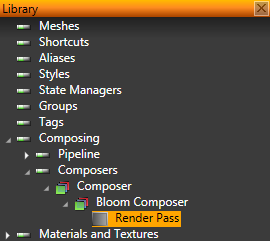
- To take the filter into use, in the Library select Composing > Composers, and in the composer, which you use to render your scene, select an existing, or create a new render pass.
- In the Properties set the Object Source property to the filter you created.
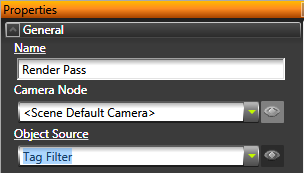
Kanzi Studio renders the objects collected by the filter.
See also
Using contains property filters
Using object type filters
Using sorting filters
Using tag filters
Filters
Open topic with navigation